
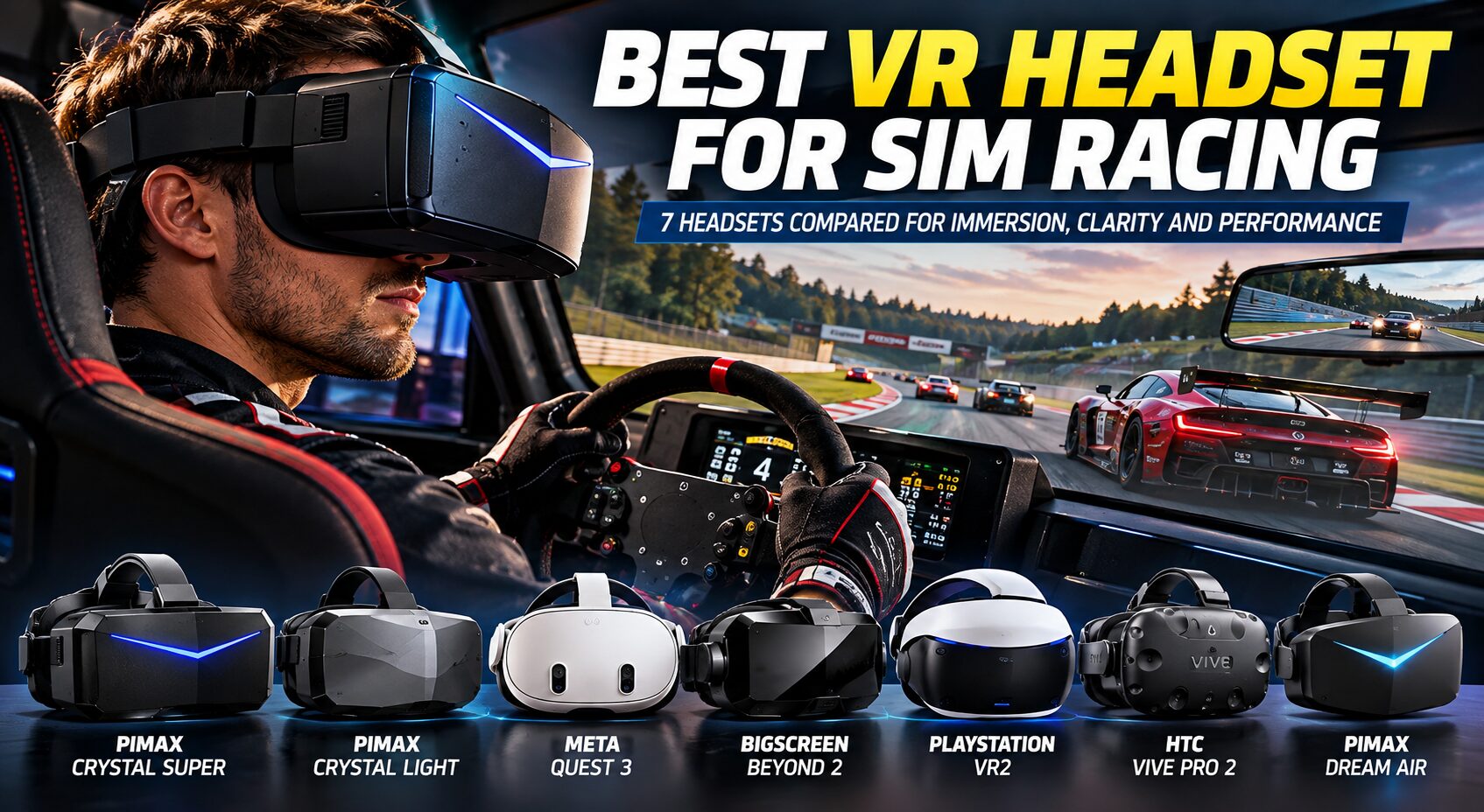
Best VR Headsets for Sim Racing: 7 Headsets I’d Choose for Immersion, Clarity, and Competitive Racing
The best VR headset for sim racing should make me feel as if I am sitting inside the actual race car rather than looking at the cockpit through a screen. I want to judge braking distances naturally, look toward an apex, check a mirror with a small head movement, sense elevation changes, and know where another car is when we are racing side by side.
Resolution matters, but I would never choose a sim racing VR headset from resolution alone. Field of view, pixels per degree, lens clarity, refresh rate, display technology, tracking, latency, connection type, headset weight, comfort, GPU requirements, software stability, and game compatibility can completely change the experience.
After comparing current dedicated PCVR and hybrid VR headsets, my premium choice for maximum cockpit detail is the Pimax Crystal Super. Its available optical engines can provide up to 3840 × 3840 resolution per eye, extremely high pixel density, eye tracking, dynamic foveated rendering, and a wide field of view.
However, I would not recommend it to every sim racer. It is expensive and its enormous rendering resolution demands serious PC hardware.
For a more attainable dedicated PCVR setup, I prefer the Pimax Crystal Light. For racers who want an affordable headset that also works extremely well outside the simulator, the Meta Quest 3 remains one of the easiest entry points into VR sim racing. If headset weight and long-session comfort are my priorities, the tiny Bigscreen Beyond 2 takes a completely different approach.
In this guide, I compare the best VR headsets for sim racing based on cockpit clarity, field of view, motion performance, comfort, tracking, connection quality, GPU requirements, software compatibility, long-session usability, and overall value.
Quick Answer: What are the Best VR Headsets for Sim Racing?
The Pimax Crystal Super is my premium choice for sim racers who want maximum cockpit clarity and have the PC hardware and budget to support it.
- Best premium overall: Pimax Crystal Super
- Best dedicated PCVR value: Pimax Crystal Light
- Best for most beginners: Meta Quest 3
- Best lightweight VR headset: Bigscreen Beyond 2
- Best OLED value if you already own one: PlayStation VR2 with PC Adapter
- Best established Lighthouse alternative: HTC VIVE Pro 2
- Best ultra-premium lightweight alternative: Pimax Dream Air
Best VR Headsets for Sim Racing Comparison
Disclosure: This post contains affiliate links. If you click through and make a purchase, we may earn a small commission at no extra cost to you.
| VR Headset | Resolution Per Eye | Refresh Rate | Connection | Best For |
|---|---|---|---|---|
| Pimax Crystal Super | Up to 3840 × 3840 | Up to 90 Hz depending on optical engine/mode | DisplayPort + USB | Maximum premium cockpit detail |
| Pimax Crystal Light | 2880 × 2880 | 72 / 90 / 120 Hz | DisplayPort + USB | Dedicated PCVR value |
| Meta Quest 3 | 2064 × 2208 | Up to 120 Hz | USB Link / Air Link | Beginners and multipurpose VR |
| Bigscreen Beyond 2 | 2560 × 2560 | 75 / 90 Hz | DisplayPort | Long-session comfort |
| PlayStation VR2 | 2000 × 2040 | 90 / 120 Hz | PS5 / PC Adapter | OLED value and PS5 owners |
| HTC VIVE Pro 2 | 2448 × 2448 | 90 / 120 Hz | DisplayPort | SteamVR Lighthouse setups |
| Pimax Dream Air | 3840 × 3552 | Up to 90 Hz | PCVR | Ultra-light premium clarity |
Important: I do not compare VR headsets using resolution alone. A headset with fewer pixels can still feel excellent when it has better lenses, comfortable ergonomics, strong edge-to-edge clarity, lower latency, or more consistent software.
How I Evaluated the Best VR Headsets for Sim Racing
I evaluate a VR headset as part of the complete simulator rather than treating it as an isolated display.
Sim racing creates different demands from ordinary room-scale VR. I spend long periods seated in approximately the same position. I constantly look at small dashboard text and distant braking markers. Smooth head tracking matters when I look through corners, and inconsistent frame pacing can feel far worse in a headset than it does on a monitor.
My Evaluation Criteria
- Cockpit clarity: How clearly I can read dashboards, timing information and steering-wheel displays.
- Distant detail: How easy it is to identify braking boards, apexes and distant cars.
- Field of view: How much of the cockpit and surrounding track I can see.
- Lens clarity: Size of the sweet spot and clarity away from the optical center.
- Motion performance: Refresh rate, persistence and perceived smoothness.
- Latency: How immediate head movement and steering feel.
- Comfort: Weight, balance, heat, facial pressure and long-session usability.
- Tracking: Stability when looking toward mirrors, apexes and side windows.
- Connection: Native DisplayPort versus compressed USB or wireless video.
- GPU demand: Hardware required to maintain stable VR frame rates.
- Software: Setup complexity, OpenXR/SteamVR support and tuning options.
- Value: Total cost including required accessories and tracking hardware.
Why Stable Performance Matters More in VR
On a monitor, a sudden frame-rate drop is annoying. Inside VR, inconsistent frame delivery can disrupt my sense of presence and may contribute to discomfort.
I would rather run a headset at a stable 90 FPS with sensible graphics settings than chase maximum resolution while repeatedly dropping below the target frame rate.
1. Pimax Crystal Super – Best Premium VR Headset for Sim Racing
Best for: High-end PC sim racing where cockpit clarity is the priority
Resolution: Up to 3840 × 3840 per eye
Pixel density: Up to 57 PPD depending on optical engine
Field of view: Up to approximately 140° horizontal depending on optical engine
Eye tracking: Yes
Connection: DisplayPort + USB
The Pimax Crystal Super is the headset I would consider when visual clarity is more important than keeping the build affordable.
Depending on the selected optical engine, the Crystal Super can provide 3840 × 3840 pixels per eye with QLED and Mini-LED technology. Pimax offers different optical configurations that trade pixel density against field of view.
Cockpit Clarity
This is where a very high-resolution headset makes sense for sim racing.
A racing cockpit contains a surprising amount of fine information: gear indicators, RPM LEDs, digital speed readouts, tire temperatures, timing deltas and tiny labels on steering-wheel controls.
Higher pixel density also helps with objects outside the cockpit. Distant braking markers and cars become easier to identify without requiring excessive supersampling.
Field of View
Pimax’s optical-engine approach is interesting because I can prioritize clarity or width.
The higher-PPD option concentrates the available pixels into a narrower view, while wider variants trade some density for additional peripheral vision.
For competitive sim racing, I find this trade-off important. Maximum sharpness helps me read the road ahead, while additional horizontal FOV improves awareness of cars beside me.
Eye Tracking and Foveated Rendering
The Crystal Super includes eye tracking and supports dynamic foveated rendering.
Instead of rendering the entire enormous VR image at maximum quality, compatible software can prioritize the area where I am actually looking.
This is particularly valuable at resolutions approaching 4K per eye because brute-force rendering is extremely demanding.
GPU Requirements
This is not a headset I would pair casually with an entry-level gaming PC.
Two 3840 × 3840 eye displays represent nearly 30 million physical display pixels before accounting for the higher render resolution often required for lens correction.
I would build around a powerful modern GPU and then tune each simulator individually.
Pros
- Exceptional potential cockpit clarity
- Up to 3840 × 3840 resolution per eye
- Multiple optical-engine choices
- Very high pixel density
- Wide-FOV option available
- Built-in eye tracking
- Dynamic foveated rendering
- Native PCVR connection
- Inside-out tracking
Cons
- Expensive
- Extremely demanding at high render resolution
- More complex than a mainstream standalone headset
- Different optical engines involve different FOV/clarity trade-offs
- Overkill for an entry-level PC
Who Should Buy It?
I recommend the Crystal Super to experienced PC sim racers building a premium cockpit around VR and prioritizing maximum visual detail.
Who Should Avoid It?
I would avoid it if I have a modest GPU, want simple plug-and-play VR, or am building my first simulator on a limited budget.
2. Pimax Crystal Light – Best Dedicated PCVR Value for Sim Racing
Best for: Dedicated PC sim racers
Resolution: 2880 × 2880 per eye
Pixel density: 35 PPD
Refresh rate: 72 / 90 / 120 Hz
Field of view: Approximately 110° horizontal
Connection: DisplayPort 1.4 + USB
Weight: Approximately 815 g
The Pimax Crystal Light is one of the headsets I find particularly interesting for a dedicated simulator because it removes features I do not necessarily need while retaining the parts that matter most for seated PCVR.
2880 × 2880 Per Eye
Its dual 2880 × 2880 displays provide substantially more raw pixel resolution than mainstream headsets such as the Quest 3.
For racing, the improvement matters most when reading fine cockpit text and identifying distant track detail.
Native DisplayPort Connection
This is one of the biggest reasons I like the Crystal Light for a permanent sim rig.
The headset receives PC video through DisplayPort rather than depending on a compressed streaming pipeline.
I do not need wireless freedom while sitting in a racing seat. I would rather have a consistent wired image with minimal compression concerns.
120 Hz Support
The headset supports 72, 90 and 120 Hz modes.
I normally start at 90 Hz because it gives me a good compromise between smoothness and GPU load. If the PC can maintain 120 FPS consistently, 120 Hz can make rapid head movement and passing scenery feel smoother.
Where It Falls Behind the Crystal Super
The Crystal Light does not include eye tracking. That means it cannot use eye-tracked dynamic foveated rendering in the same way as the Crystal Super.
Its 35 PPD is also considerably lower than the highest-density Crystal Super configurations.
However, the lower resolution is much easier to drive.
Comfort
At roughly 815 grams, this is not a lightweight headset.
For long races, fit and balance matter. I would spend time adjusting the strap rather than simply tightening the headset against my face.
Pros
- 2880 × 2880 resolution per eye
- 35 PPD
- Strong cockpit text clarity
- 72/90/120 Hz modes
- Native DisplayPort connection
- No wireless compression requirement
- Inside-out tracking
- Designed around PCVR
- Lower price than Crystal Super
Cons
- Heavy compared with compact headsets
- No eye tracking
- No dynamic eye-tracked foveated rendering
- Still requires a strong GPU
- Less convenient than Quest 3 for general standalone VR
Who Should Buy It?
I recommend the Crystal Light to racers who mainly use VR in a PC simulator and want high clarity without moving into the extreme price range of flagship headsets.
3. Meta Quest 3 – Best VR Headset for Most Beginners
Best for: First-time VR racers and multipurpose VR
Resolution: 2064 × 2208 per eye
Maximum refresh rate: 120 Hz
Field of view: Approximately 110° horizontal
Connection: USB-C Link or wireless Air Link
Lenses: Pancake
The Meta Quest 3 is not the highest-resolution sim racing headset in this guide, but it is one of the easiest recommendations for someone entering VR.
It combines good pancake lenses, a large usable sweet spot, inside-out tracking, standalone capability and PCVR support.
Why Pancake Lenses Matter
Raw panel resolution does not tell me how easy it is to see a sharp image.
The Quest 3’s pancake optics give me a relatively broad clear area, allowing my eyes to move around the cockpit without requiring constant head movement just to keep text inside a tiny optical sweet spot.
PC Sim Racing
Quest 3 supports PC VR through Meta Quest Link with a USB cable or Air Link over Wi-Fi.
For a permanent simulator, I generally prefer a good wired connection. Wireless VR is convenient, but a racing rig does not require me to walk around the room.
The Compression Trade-Off
Unlike a native DisplayPort PCVR headset, the Quest receives encoded PC video.
At good settings the image can look excellent, but compression, bitrate, USB quality and encoding performance become part of the visual pipeline.
This is one reason I prefer the Crystal Light when building a dedicated high-end simulator.
Why Quest 3 Still Makes Sense
Quest 3 is far more versatile.
When I leave the simulator, I still have a standalone headset for VR games, fitness, media and mixed-reality applications.
Pros
- Excellent pancake lenses
- Large usable sweet spot
- 2064 × 2208 resolution per eye
- Up to 120 Hz
- Good inside-out tracking
- Wired and wireless PCVR options
- Standalone VR capability
- Easy entry into PCVR
- Strong overall value
Cons
- No native DisplayPort PC video
- PCVR uses encoded video
- Battery management is relevant during long sessions
- Less cockpit detail than high-resolution Pimax headsets
- Stock strap may not be ideal for long races
Who Should Buy It?
I recommend Quest 3 to new VR racers, people who want one headset for racing and general VR, and buyers who prioritize simplicity and versatility.
4. Bigscreen Beyond 2 – Best Lightweight VR Headset for Long Sim Racing Sessions
Best for: Comfort and long endurance races
Resolution: 2560 × 2560 per eye
Display: Micro-OLED
Refresh rate: 75 / 90 Hz
Field of view: 108° horizontal / 96° vertical
Headset weight: Approximately 107 g
Tracking: SteamVR Base Stations required
The Bigscreen Beyond 2 solves a completely different problem: headset bulk.
At around 107 grams for the headset itself, it is dramatically lighter than conventional high-resolution VR headsets.
Why Weight Matters in Sim Racing
A 15-minute VR demonstration and a two-hour endurance race are completely different experiences.
During a long stint, pressure on my cheeks, forehead and neck becomes increasingly noticeable. A lightweight headset can therefore improve my actual racing experience even if another model wins the specification comparison.
Micro-OLED Displays
The dual 2560 × 2560 micro-OLED displays provide true blacks and excellent contrast.
That is especially attractive in night racing. Dark cockpit areas remain genuinely dark while dashboard displays, headlights and illuminated track sections stand out.
SteamVR Tracking
The major complication is that Beyond 2 requires SteamVR base stations.
If I already own a Lighthouse setup, this is straightforward. If I am starting from nothing, I must include base stations in the total cost.
Pros
- Extremely lightweight
- Excellent long-session potential
- 2560 × 2560 per eye
- Micro-OLED displays
- True blacks and excellent contrast
- DisplayPort connection
- Compact physical design
- Good choice for endurance racing
Cons
- SteamVR base stations required
- Tracking hardware adds cost
- 90 Hz maximum refresh rate
- Less straightforward than Quest 3
- Not the cheapest route into PCVR
Who Should Buy It?
I recommend Beyond 2 to serious sim racers who prioritize comfort and already own, or are willing to build, a SteamVR Lighthouse tracking setup.
5. PlayStation VR2 – Best OLED Value for Existing PSVR2 Owners
Best for: PS5 racers and existing PSVR2 owners entering PCVR
Resolution: 2000 × 2040 per eye
Display: OLED
Refresh rate: 90 / 120 Hz
PC use: Requires compatible PC adapter and DisplayPort cable
PlayStation VR2 becomes particularly interesting if I already own one.
Its OLED panels provide deep black levels and strong contrast, while 90 Hz and 120 Hz modes suit racing well.
PC Compatibility
Sony’s PC adapter allows PSVR2 to access compatible SteamVR titles on Windows.
The setup requires the adapter, a DisplayPort 1.4 cable and suitable PC hardware.
Important PC Limitations
Some PSVR2 features available on PS5 are not available when the headset is used on PC. Sony specifically notes limitations including HDR, eye tracking, headset feedback and several advanced haptic features.
That reduces some of the technical advantage of the headset when I compare it directly with dedicated PCVR products.
Pros
- OLED black levels
- Strong contrast
- 90/120 Hz
- Good value if already owned
- Works with PS5
- PCVR possible through official adapter
Cons
- PC adapter required
- DisplayPort cable sold separately for PC use
- Some PS5 headset features unavailable on PC
- Fresnel optics have a smaller sweet spot than good pancake lenses
- Not my first choice when buying specifically for premium PC sim racing
6. HTC VIVE Pro 2 – Best Established Lighthouse Alternative
Resolution: 2448 × 2448 per eye
Refresh rate: 90 / 120 Hz
Field of view: Up to approximately 120° horizontal
Tracking: SteamVR
The HTC VIVE Pro 2 is no longer the newest headset here, but it remains relevant for racers with an established SteamVR ecosystem.
Its 2448 × 2448 resolution per eye, up-to-120-Hz refresh rate and wide field of view remain useful for simulation.
Why I Would Still Consider It
If my simulator room already contains Lighthouse base stations, moving to the VIVE Pro 2 can be straightforward.
The headset also has integrated audio and a mature PCVR ecosystem.
Where Newer Headsets Improve
Modern pancake and advanced aspheric optics can provide a larger usable clear area than older lens designs.
For someone building a new VR system from scratch, I would compare the total VIVE system cost carefully against Crystal Light, Quest 3 and Beyond 2.
Pros
- 2448 × 2448 per eye
- Up to 120 Hz
- Wide field of view
- Excellent Lighthouse tracking
- Integrated audio
- Established SteamVR ecosystem
Cons
- Older optical design than newer alternatives
- Base stations add cost for new buyers
- Bulkier than Beyond 2
- Less attractive value for a completely new setup
7. Pimax Dream Air – Best Ultra-Premium Lightweight Alternative
Best for: Premium users wanting very high clarity in a compact headset
Resolution: 3840 × 3552 per eye
Display: Micro-OLED
Refresh rate: Up to 90 Hz
Eye tracking: Yes
The Pimax Dream Air represents the new generation of extremely high-resolution compact PCVR headsets.
Its combination of Sony micro-OLED panels, 3840 × 3552 resolution per eye and a very lightweight design is particularly appealing for simulation.
For me, however, this is an enthusiast option rather than the safe default recommendation. It commands a premium price and requires substantial PC performance.
Pros
- Extremely high resolution
- Micro-OLED contrast
- Very lightweight design
- Eye tracking
- Strong potential for cockpit clarity
Cons
- Very expensive
- High GPU requirements
- 90 Hz maximum refresh rate
- Newer platform with less long-term history than established alternatives
VR vs Ultrawide vs Triple Monitors for Sim Racing
| Setup | Main Advantage | Main Disadvantage |
|---|---|---|
| VR headset | True stereoscopic depth and natural head movement | Comfort and GPU demands |
| 49–57 inch ultrawide | Easy to use with no headset | Less side coverage than VR or triples |
| Triple monitors | Excellent peripheral vision without wearing a headset | Large footprint and complex setup |
Why I Choose VR
VR gives me something a monitor cannot fully reproduce: stereoscopic depth.
I can physically turn my head toward the apex. The dashboard has depth. Mirrors occupy real spatial positions. Elevation changes feel more obvious, and cars beside me have physical scale.
Why I Sometimes Prefer Monitors
A monitor is easier for very long sessions. I can see my steering wheel, keyboard, button box, phone and room without removing a headset.
Triple screens also provide excellent peripheral visibility while allowing me to remain connected to the physical cockpit.
I therefore do not consider VR automatically superior. It is a different approach to immersion.
What Resolution Do I Need for Sim Racing VR?
Resolution is especially important in racing because I constantly look at distant objects.
Around 2000 × 2000 Per Eye
This level can provide a good modern VR experience, especially with strong optics. Quest 3 and PSVR2 demonstrate that lens quality and display technology can matter as much as the raw number.
Around 2500–2900 Pixels Per Eye
This is a strong premium range. Headsets such as Beyond 2 and Crystal Light can make cockpit text and distant detail substantially clearer.
3840 × 3840-Class Headsets
This represents extreme PCVR resolution.
The clarity potential is enormous, but so is the rendering workload. I would not buy this class of headset without considering the graphics card at the same time.
Pixels Per Degree Matter
PPD describes how densely the available pixels are distributed across my field of view.
A headset can have enormous total resolution but spread those pixels over a very wide FOV. Another headset may concentrate fewer pixels into a smaller view and appear sharper in the center.
For sim racing, I care about both PPD and FOV rather than treating either number independently.
How Much Field of View Do I Need?
A wider field of view improves peripheral awareness.
That matters when I am approaching another car, looking toward a hairpin or checking what is happening beside the cockpit.
| Horizontal FOV | My Assessment |
|---|---|
| Below 100° | Usable, but can feel restrictive |
| 100–110° | Good mainstream VR range |
| 110–120° | Strong sim racing immersion |
| 120°+ | Excellent peripheral potential if optics remain clear |
I would not sacrifice everything else merely to obtain the largest FOV number. Distortion, lens clarity and actual usable FOV matter too.
What Refresh Rate Is Best for VR Sim Racing?
| Refresh Rate | My Assessment |
|---|---|
| 72–75 Hz | Usable, but not my preferred racing target |
| 90 Hz | Excellent balance for high-resolution VR |
| 120 Hz | Very smooth if the PC can maintain it |
90 Hz is my normal target for premium sim racing VR.
Maintaining 90 frames per second consistently at high resolution is already demanding.
I prefer stable 90 Hz to an unstable 120 Hz configuration that repeatedly falls back into reprojection.
DisplayPort vs USB Link vs Wireless VR
DisplayPort
A native DisplayPort headset receives a direct video signal from the graphics card.
This is my preferred approach for a permanent simulator because I do not need to move around the room.
USB Link
Quest 3 can receive encoded PCVR video through USB.
The setup is convenient, but video encoding and decoding become part of the pipeline.
Wireless
Wireless PCVR removes the cable and is excellent for room-scale gaming.
For sim racing, the benefit is smaller because I remain seated. Network quality, bitrate and latency also become additional variables.
For that reason, I normally prioritize consistency over wireless freedom inside a cockpit.
What GPU Do I Need for VR Sim Racing?
This is one of the most important questions in the entire guide.
VR renders separate views for both eyes and often uses a render resolution above the physical panel resolution to compensate for lens distortion.
Entry-Level VR
For less demanding headsets and simulations, a modern mid-range GPU can work when graphics settings and render scale are managed carefully.
Quest 3
A good modern mid-range PC can provide an enjoyable experience, but demanding simulators such as Assetto Corsa Competizione can still require aggressive tuning.
Pimax Crystal Light
I would prefer a strong upper-mid-range or high-end GPU if I want to take advantage of the headset’s resolution while maintaining 90 Hz.
Crystal Super
This is high-end territory.
Dynamic foveated rendering can reduce the workload, but I would still pair a headset of this class with one of the fastest gaming GPUs available within my budget.
CPU Performance Also Matters
Sim racing is not purely GPU limited.
Large grids, physics calculations, AI opponents and multiplayer environments can place substantial load on the CPU.
A balanced simulator needs both strong single-thread CPU performance and sufficient GPU power.
Comfort, Heat, and Motion Sickness
Weight
A heavy headset may feel acceptable for 20 minutes and uncomfortable after two hours.
This is why the Bigscreen Beyond 2 is so interesting despite not winning the raw-resolution contest.
Balance
Weight distribution matters almost as much as total weight. A well-balanced headset can feel better than a lighter headset pulling forward against my face.
Heat
Sim racing already involves physical activity from force-feedback steering and braking. Adding a warm VR headset can become uncomfortable during long sessions.
Motion Sickness
Racing can be challenging for new VR users because my eyes see acceleration while my body remains stationary.
I recommend beginning with short sessions.
- Start with 10–15 minute sessions.
- Use a stable frame rate.
- Avoid pushing through nausea.
- Use a fan for airflow.
- Begin with slower cars.
- Avoid excessive camera movement.
- Increase session length gradually.
If I start feeling sick, I stop. Trying to “train through” significant nausea usually makes the experience worse.
Best Sim Racing Games for VR
Headset hardware is only useful when the simulator provides good VR support.
iRacing
iRacing is one of my preferred VR racing platforms because competitive racing benefits enormously from natural head movement and depth perception.
Assetto Corsa
Assetto Corsa remains attractive because of its enormous mod ecosystem and relatively flexible VR configuration.
Assetto Corsa Competizione
ACC can look impressive in VR but is demanding. I expect to spend more time balancing render resolution, anti-aliasing and frame rate.
Automobilista 2
Automobilista 2 can provide an excellent VR racing experience and is one of the titles I would use when demonstrating VR to another racing enthusiast.
Le Mans Ultimate
For endurance racing fans, VR can add substantial cockpit presence, but hardware requirements and current software support should always be checked before choosing a headset specifically around one title.
DiRT Rally and Rally Simulations
VR is particularly convincing in rally because I naturally look through corners and experience elevation and road camber in three dimensions.
Best VR Headset for Sim Racing: Decision Matrix
| If My Priority Is… | I Would Consider… | Why |
|---|---|---|
| Maximum premium clarity | Pimax Crystal Super | Extremely high resolution and eye tracking |
| Dedicated PCVR value | Pimax Crystal Light | High resolution plus native DisplayPort |
| First VR headset | Meta Quest 3 | Easy setup and excellent versatility |
| Lowest headset weight | Bigscreen Beyond 2 | Approximately 107 g headset |
| I already own PSVR2 | PSVR2 + PC Adapter | Lower-cost route into SteamVR |
| I already own Lighthouse tracking | Beyond 2 or VIVE Pro 2 | Uses existing SteamVR infrastructure |
| Wireless general VR plus racing | Meta Quest 3 | Standalone, wired and wireless flexibility |
| Long endurance races | Bigscreen Beyond 2 | Very low headset weight |
Common VR Sim Racing Buying Mistakes
Buying the Highest Resolution Without Checking the GPU
A 3840 × 3840-per-eye headset does not help if I must reduce render resolution dramatically because my graphics card cannot maintain the target frame rate.
Ignoring Lens Quality
Panel resolution and visible clarity are not the same thing. The lenses determine how much of that panel detail I can actually see clearly.
Ignoring Weight
A specification sheet cannot tell me how my neck and face will feel after a two-hour race.
Assuming Wireless Is Automatically Better
Wireless freedom is much less important when I am physically attached to a racing cockpit.
Ignoring the Total System Cost
Some headsets require base stations, controllers, adapters, upgraded straps or additional audio hardware.
Running Maximum Graphics Settings
VR requires consistency. I reduce unnecessary settings before sacrificing stable frame delivery.
Ignoring IPD
Correct interpupillary-distance adjustment affects clarity and comfort. I always configure IPD properly before judging a headset.
Starting With Long VR Sessions
New users should build VR tolerance gradually rather than beginning with a multi-hour endurance race.
Frequently Asked Questions About VR Headsets for Sim Racing
What is the best VR headset for sim racing?
For a premium high-end PC cockpit, I would consider the Pimax Crystal Super because of its extremely high resolution, eye tracking and available high-clarity or wide-FOV optical configurations. For most buyers, however, budget, GPU performance and comfort may make Crystal Light or Quest 3 more practical.
What is the best value VR headset for sim racing?
I consider the Pimax Crystal Light particularly strong for dedicated PCVR because it combines 2880 × 2880 resolution per eye with a native DisplayPort connection. Quest 3 offers better overall versatility.
Is Meta Quest 3 good for sim racing?
Yes. Quest 3 has good pancake lenses, up to 120 Hz support and PCVR compatibility through Link and Air Link. Its main limitation for dedicated PC racing is that the PC image is streamed rather than delivered through native DisplayPort.
Is Pimax Crystal Light better than Quest 3 for sim racing?
For a permanent PC racing cockpit, I prefer Crystal Light when image clarity and native DisplayPort matter most. Quest 3 is more versatile, easier for general VR and usually makes more sense for a first headset.
Is VR better than triple monitors for sim racing?
VR provides stereoscopic depth, natural head movement and complete visual immersion. Triple monitors provide excellent peripheral visibility without requiring me to wear a headset. Neither is universally better.
Is VR better than an ultrawide monitor?
VR is substantially more immersive because I can look naturally around the cockpit. An ultrawide is easier to use, more comfortable for extremely long sessions and allows me to see my physical controls.
Is 90 Hz enough for sim racing VR?
Yes. I consider a stable 90 Hz an excellent target for high-resolution racing VR.
Is 120 Hz better?
120 Hz can feel smoother, but it increases GPU requirements significantly. I prefer stable 90 Hz over inconsistent 120 Hz.
How much VR resolution do I need?
Around 2000 pixels per eye can provide a good experience with strong lenses. Headsets around 2500–2900 pixels per eye improve fine detail substantially. 3840 × 3840-class hardware targets extreme premium clarity but requires much more rendering performance.
What does PPD mean?
PPD means pixels per degree. It describes how many pixels are concentrated into each degree of my visible field and is useful when comparing perceived detail between headsets with different fields of view.
What field of view is good for sim racing?
Around 100–110° horizontal is already useful. Wider headsets can improve peripheral awareness, but lens quality and distortion also matter.
Do I need eye tracking?
No, but eye tracking can enable dynamic foveated rendering, which becomes increasingly useful with extremely high-resolution headsets.
Does sim racing need VR controllers?
Usually not during the actual race. I use my steering wheel, pedals and buttons. Controllers may still be required during setup or by the VR platform.
Can I use VR with iRacing?
Yes. iRacing is widely used with PCVR headsets and is one of the simulators where I find VR particularly valuable.
Can I use VR with Assetto Corsa?
Yes. Assetto Corsa supports VR and remains popular for VR racing because of its large mod ecosystem.
Is Assetto Corsa Competizione demanding in VR?
Yes. ACC can require substantial GPU performance, particularly when combining high headset resolution with large grids and high graphics settings.
Do I need a powerful CPU for VR sim racing?
Yes. The GPU handles much of the rendering workload, but racing simulations also use the CPU heavily for physics, AI and large fields of cars.
Can VR cause motion sickness?
Yes. New users should begin with short sessions, maintain a stable frame rate and stop immediately if significant nausea develops.
What is the most comfortable VR headset for sim racing?
The Bigscreen Beyond 2 is particularly interesting because the headset itself weighs approximately 107 grams, dramatically less than many conventional PCVR headsets.
Should I use wireless VR for sim racing?
You can, but I generally prefer wired VR in a permanent simulator. Since I remain seated, the cable is less restrictive and a wired connection removes wireless-network quality from the performance equation.
Do I need base stations?
Not for Quest 3, Crystal Light or Crystal Super when using their inside-out tracking. Bigscreen Beyond 2 requires SteamVR base stations.
Is PSVR2 good for PC sim racing?
It can be a good option if you already own the headset. PC support requires Sony’s PC adapter and a compatible DisplayPort cable, and several PS5-specific features are unavailable in PC mode.
Can I race for several hours in VR?
Yes, but comfort varies dramatically between users and headsets. Weight, facial interface, heat, ventilation, IPD and strap adjustment become increasingly important during long races.
Final Verdict: Which VR Headset Should You Buy for Sim Racing?
If I were building a premium VR-first simulator and wanted maximum cockpit detail, the Pimax Crystal Super would be at the top of my shortlist.
Its extremely high-resolution display options, eye tracking and dynamic foveated rendering make sense for sim racing because racing is one of the few VR applications where I spend hours studying small cockpit displays and distant track details.
But the Crystal Super is not the headset I would automatically tell every racer to buy.
The Pimax Crystal Light is the more practical dedicated PCVR choice for many serious racers. Its 2880 × 2880 resolution per eye is already extremely sharp, it supports up to 120 Hz, and its DisplayPort connection fits a permanent cockpit very well.
The Meta Quest 3 is the headset I would choose for many first-time VR buyers. Its pancake lenses provide a large usable clear area, PCVR setup is accessible, and the headset remains useful when I leave the simulator.
The Bigscreen Beyond 2 becomes particularly compelling when comfort is my priority. A headset weighing around 107 grams can make a major difference during endurance racing, and its micro-OLED displays provide excellent contrast.
If I already own a PlayStation VR2, I would seriously consider adding the PC adapter before buying another headset. It is not as feature-complete on PC as it is on PS5, but it can provide an economical route into SteamVR racing.
The HTC VIVE Pro 2 remains relevant for existing Lighthouse users, while newer ultra-premium products such as the Pimax Dream Air demonstrate how quickly high-resolution VR is becoming smaller and lighter.
My final advice is to buy the VR headset and graphics card as one system.
I would rather use a slightly lower-resolution headset at a locked, smooth frame rate than own the highest-resolution headset available and spend every race fighting stutter and reprojection.
I would also place comfort above specifications once I start racing for more than an hour at a time. Resolution creates the first impression. Comfort determines whether I still want to wear the headset at the end of an endurance stint.
My Final Recommendations
Best premium overall: Pimax Crystal Super
Best dedicated PCVR value: Pimax Crystal Light
Best for beginners: Meta Quest 3
Best lightweight option: Bigscreen Beyond 2
Best for existing PSVR2 owners: PlayStation VR2 + PC Adapter
Best established Lighthouse alternative: HTC VIVE Pro 2
Best ultra-premium lightweight alternative: Pimax Dream Air
My preferred refresh-rate target: Stable 90 Hz or higher
Most important buying factors: Clarity, lens quality, stable frame rate, FOV and comfort
Choose the Pimax Crystal Super
I would choose the Crystal Super when I am building a no-compromise VR cockpit, have a high-end gaming PC and prioritize maximum visual detail.
Check Pimax Crystal Super
Choose the Pimax Crystal Light
I would choose the Crystal Light when I want high-resolution dedicated PCVR without paying for the most extreme flagship hardware.
Check Pimax Crystal Light
Choose the Meta Quest 3
I would choose Quest 3 when I want an easier entry into sim racing VR and one headset that also works well for standalone VR.
Check Meta Quest 3
Best VR Headset for Sim Racing: Bottom Line
There is no single VR headset that fits every simulator. A competitive iRacing driver with a flagship gaming PC may value the resolution and eye tracking of the Pimax Crystal Super. A dedicated PC racer may find the Crystal Light offers the better balance. A newcomer may be happier with the simplicity and versatility of Quest 3, while an endurance racer may value the exceptionally low weight of Bigscreen Beyond 2 more than another increase in raw resolution.
The best VR headset for sim racing is therefore the headset that matches my PC performance, cockpit, preferred simulations, session length and tolerance for setup complexity. I prioritize stable performance first, clear optics second, and specifications only after considering how the complete system will work together.

Hi, I’m Peter Edwards, a lifelong sim racing enthusiast, tech tinkerer, and automotive geek with a passion for making virtual racing feel as real as possible. I’ve spent years testing steering wheels, pedals, and full cockpit rigs—from entry-level gear to pro-grade setups—to help others build immersive, affordable racing experiences at home.
When I’m not tightening bolts on my rig or tuning force feedback curves, you’ll find me comparing telemetry data, exploring new racing titles, or helping fellow racers fine-tune their setups. My goal is to share honest, experience-based insights that help every driver—from casual weekend racers to aspiring eSports pros—get faster, smoother, and more connected to the track.
I write for SimRacingEnthusiast.com, where I share deep-dive reviews, setup guides, and honest opinions on the latest in the sim racing world.
One Comment